


If your Off Stamp X-Cube suddenly says “Pod Error Type 3” — or, because apparently Roman numerals wanted in on the chaos, “Pod Error Type III” — you are not alone. Searches for “pod error type 3 Off Stamp” and “Off Stamp pod error type 3” are already pretty popular, which tells me two things.
First, a lot of people are seeing this message.
Second, Off Stamp really needs to publish a simple error-code chart. Preferably yesterday.
At the moment, I haven’t found an official Off Stamp page that explains exactly what each Pod Error message means. Off Stamp’s own troubleshooting advice is more general: check the battery, inspect the pod, clean the contacts and make sure the pod is seated properly. That lines up pretty well with what users are reporting in discussions online. Most of the “Pod Error” messages seem to point to a problem with the pod connecting to, communicating with or receiving power from the X-Cube battery/device.
So, is Pod Error Type 1 Off Stamp the same as Pod Error Type 3 Off Stamp? Maybe. Maybe not. Without an official decoder, we can’t say that for sure. But we can look at what’s been reported, what fixes people have tried and what the most likely causes are.
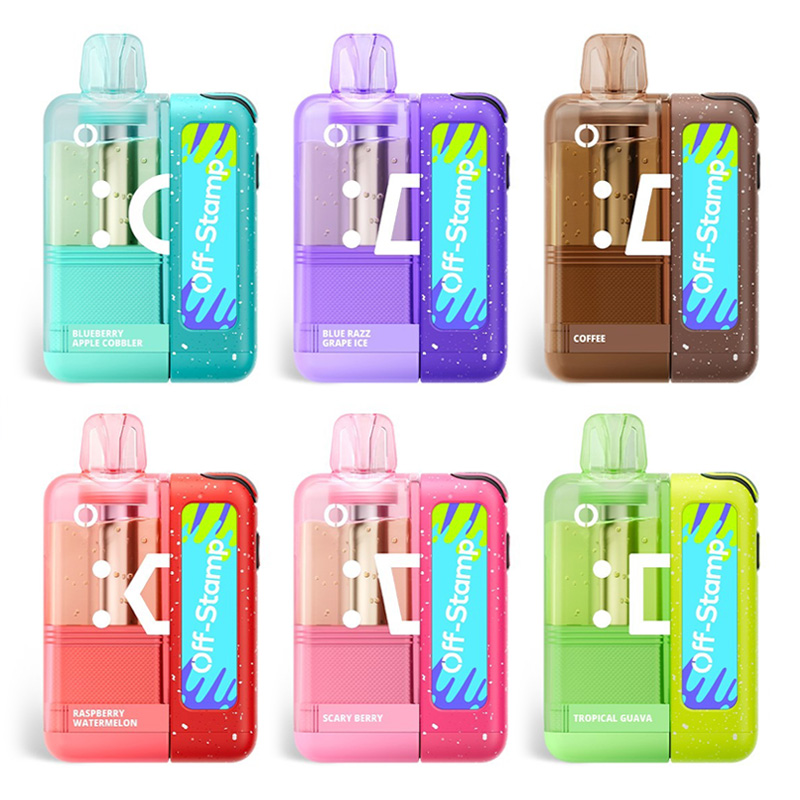
Use the coupon code VAPEGRL for a 15% discount at EightVape.
First: What Off Stamp Pod Error Messages Have People Reported?
Based on user discussions, the Off Stamp X-Cube appears to show several different pod-related error messages, including:
- Pod Error Type I / Pod Error Type 1
- Pod Error Type II / Pod Error Type 2
- Pod Error Type III / Pod Error Type 3
- Pod Error Type V / Pod Error Type 5
- Pod Error Type VI / Pod Error Type 6
There may also be other messages, such as Type IV, depending on the firmware and the exact issue. The problem is that Off Stamp does not appear to publish an official public list explaining these messages, so any exact decoding online should be treated with caution.
That means this article is partly troubleshooting guide, partly educated guesswork and partly “please stop throwing your vape at the wall, I am begging you.”
What Does Off Stamp Pod Error Type 3 Mean?
The short answer: Off Stamp Pod Error Type 3 most likely means that the X-Cube device is having trouble recognizing, powering or communicating with the pod.
That’s not an official definition. It’s a practical interpretation based on the behavior people describe.
People seeing Off Stamp pod error type 3 often report things like:
- The pod was working and then suddenly stopped.
- The pod still shows juice or battery, but it won’t hit.
- The error comes and goes.
- Cleaning the contacts sometimes helps.
- Disconnecting and reconnecting the pod sometimes helps.
- Turning the device off and back on sometimes helps.
- The same battery may work with other pods, suggesting that the pod — not the X-Cube base — could be the problem.
That points toward a few likely causes: dirty contacts, a pod that isn’t seated quite right, a weak connection between the pod and battery, a pod that’s failing internally, or a software/recognition issue between the pod and the X-Cube device.
Very glamorous. Very futuristic. Still somehow solved with a cotton swab half the time.
What Does Off Stamp Pod Error Type 1 Mean?
Pod Error Type 1 Off Stamp seems to be one of the other common messages people search for. Again, Off Stamp doesn’t appear to publish a specific definition for Type 1, but user discussions make it sound like another pod-recognition or connection error.
My best guess is that Off Stamp Pod Error Type 1 may happen when the X-Cube can detect that something is attached, but the connection is not right enough for the device to fire. That could mean a loose pod, dirty contact points, slightly misaligned magnets, a defective pod or a problem with the battery side.
Basically, the device is saying, “I see a pod, but I do not trust this pod.”
Relatable, honestly.
What About Pod Error Type 2, Type 5, Type 6 and Other Messages?
Type 2, Type 5 and Type 6 have also been mentioned in user discussions. Because there’s no official list, I wouldn’t try to assign a neat definition to every number. It’s tempting to say, “Type 1 means this, Type 2 means that, Type 3 means the other thing,” but that would be pretending we know more than we actually do.
What we can say is this: when the X-Cube displays a Pod Error message, the problem usually seems to live somewhere in this group of issues:
- The pod isn’t seated properly.
- The metal contacts are dirty.
- The magnets or contact points aren’t lining up.
- The pod’s internal battery or electronics aren’t behaving correctly.
- The X-Cube base/battery is having trouble recognizing the pod.
- The pod is defective.
- The pod may not be authentic or may not be fully compatible.
If one pod gives errors but other pods work on the same X-Cube, the pod is probably the problem. If every pod gives errors on the same X-Cube, the reusable device/battery is probably the problem.
Try These Fixes First
Before you assume that the pod is dead, try the normal, non-chaotic troubleshooting steps first.
1. Remove and Reattach the Pod
Take the pod off the X-Cube device and reattach it. Make sure it snaps into place cleanly and that the magnets are lined up correctly.
This sounds too simple to be useful, but with magnetic pod systems, a slightly imperfect connection can be enough to cause weird behavior. Off Stamp’s official troubleshooting advice mentions loose or damaged connections and says the pod should be reinserted securely.
2. Clean the Contacts
Use a dry cotton swab or soft cloth to clean the metal contacts on both the pod and the X-Cube device. If there’s visible residue, you can use a tiny amount of isopropyl alcohol on the swab, but don’t soak anything. Let everything dry completely before reconnecting the pod.
E-liquid residue, pocket lint and general life crumbs can all interfere with the connection. Off Stamp’s own troubleshooting page recommends cleaning the metal contacts on the pod and battery because residue can block the connection and prevent the pod from firing.
3. Check the Pod for Leaks, Cracks or Clogs
Look for obvious damage, leaking e-liquid or gunk around the airflow holes. If the pod is leaking badly or physically damaged, I wouldn’t keep using it.
Off Stamp’s troubleshooting guide says to inspect the pod for visible damage, cracks, leaks or excess e-liquid buildup. If you see those things, the pod may need to be replaced.
4. Charge the Device
A low battery can make pod systems act weird. Charge the X-Cube device and try again.
Off Stamp’s official troubleshooting guidance lists battery drain as one of the most common reasons a pod system won’t hit, and it recommends checking the battery and charging the device if needed.
5. Power Cycle the X-Cube
Some users say they’ve fixed Pod Error Type III by turning the X-Cube off and back on. I’d treat this as a reasonable thing to try. It’s basically the vape version of “have you tried turning it off and on again?” Annoying? Yes. Frequently effective? Also yes.
6. Try a Different Pod or Different Battery
This is the best diagnostic step if you have another pod or another X-Cube device available.
- If the same pod errors on multiple devices, the pod is probably defective.
- If multiple pods error on the same X-Cube, the device/battery is probably defective.
- If only one pod gives a Pod Error Type 3 Off Stamp message, don’t overthink it. That pod is suspicious.
7. Give the Pod a Gentle Tap — Not a Throw
A few people online claim that banging or throwing the pod fixed their error. Please do not do that.
A very gentle tap against your palm a few times? Fine. That might help if a contact, magnet or tiny internal component is barely out of position. But throwing the pod at the floor or smacking it against a hard surface is a bad idea. These pods contain batteries, e-liquid and electrical components. If the pod is already faulty, adding impact damage is not exactly a wellness plan.
Tap gently if you want. Don’t launch it across the room like it owes you money.
Should You Open the Off Stamp Pod?
I wouldn’t.
Some pod systems have user-discovered fixes involving opening the pod and adjusting wires or contacts. I have not found evidence that the Off Stamp X-Cube pod has a similar clean, repeatable fix.
The X-Cube is marketed as a closed pod system with replaceable pods. Off Stamp’s official troubleshooting steps focus on cleaning, charging, checking connections and replacing defective pods — not opening the pod and rearranging anything inside.
Opening the pod could cause leaks, break plastic tabs, damage the battery or create a short. It could also make a warranty claim harder because Off Stamp’s warranty excludes damage caused by modification, alteration, repair or service by anyone other than Off Stamp or its authorized partners.
So, my advice is simple: if the pod is erroring and basic troubleshooting doesn’t fix it, treat it as defective. Don’t perform tiny vape surgery on your kitchen counter.
Make Sure Your Off Stamp Pod Is Authentic
This part matters more than people think.
Off Stamp has an official verification page where you can enter an 18-digit security code or scan the QR code from the box. Off Stamp says this anti-counterfeiting technology helps identify counterfeit products and helps ensure product quality and safety.
You can check authenticity on Off Stamp’s official website here: Off Stamp product verification.
That’s worth doing if you’re getting repeated Pod Error messages, especially if you bought your pods from a random online seller, a marketplace listing, a gas station with suspiciously flexible pricing or anywhere that doesn’t feel totally above board.
A fake or third-party “compatible” pod could cause all kinds of weird problems. It might not line up correctly with the contacts. It might not communicate properly with the X-Cube device. It might use cheaper internal components. It might leak. It might not be recognized by the device at all.
Off Stamp’s warranty also says coverage is only available for products purchased directly from Off Stamp or authorized retailers, and it excludes non-genuine devices and damage caused by incompatible products.
That means authenticity isn’t just a safety issue. It could also affect whether Off Stamp will help you if something goes wrong.
Could Off Stamp Be Using a Lock-Out Chip?
This is speculation, but it’s reasonable speculation.
The X-Cube is not just a dumb battery. It has a screen, displays e-liquid and battery levels, supports multiple pod types and uses a reusable smart charging device. Off Stamp also has an official product-verification system and warranty language excluding non-genuine and incompatible products.
So, could Off Stamp be using some kind of pod-recognition system — possibly even a chip or authentication-style connection — to deter counterfeit or third-party pods?
Maybe.
I haven’t found Off Stamp publicly saying, “Yes, the X-Cube uses a lock-out chip.” So I would not state that as fact. But it would not surprise me if the device checks whether the pod is the right type, whether it can communicate properly with the pod and whether the pod is behaving as expected.
If that’s happening, a fake pod or poorly made third-party “compatible” pod could theoretically trigger a Pod Error message even if the pod looks like it fits.
Again: not confirmed. But it fits the pattern.
When to Use Off Stamp’s Warranty Claim
If you’ve cleaned the contacts, charged the device, reattached the pod, gently tapped it, power-cycled the X-Cube and tried another pod or battery if available, it’s time to stop fighting with it.
Off Stamp has a Warranty Claim form on its official website. The form asks for the problem type, a security code from the package, a description of the issue, attachments showing the problem and proof of purchase if available.
You can find the official form here: Off Stamp warranty claim.
Off Stamp’s warranty policy says devices have a 12-month warranty period from the date of manufacture and that customers may be eligible for replacement after confirmation from Off Stamp or authorized partners, assuming the issue is a covered defect and proper evidence is provided.
A few important catches:
- You may need proof of purchase.
- You may need the original packaging.
- The product needs to be genuine.
- The warranty may only apply in the original country of purchase.
- Damage from misuse, modification, incompatible products, moisture, physical abuse or non-genuine devices is excluded.
So, don’t throw the pod at the wall. Don’t pry it open. Don’t buy mystery pods from a seller called definitely-real-vapes-warehouse-928. Keep the box, keep the receipt and use the official claim process if the pod is genuinely defective.
The Bottom Line
If you’re seeing Off Stamp Pod Error Type 3, Pod Error Type 1 Off Stamp, Off Stamp Pod Error Type 1 or any other X-Cube pod error, the most likely cause is a connection, recognition or pod defect issue.
Start with the simple fixes:
- Clean the contacts.
- Reattach the pod securely.
- Charge the device.
- Power cycle the X-Cube.
- Try another pod or battery.
- Check that the pod is authentic.
- Give it a gentle tap against your palm if you want, but don’t bang it, drop it or throw it.
If the same pod keeps erroring, it’s probably defective. If every pod errors on the same device, the X-Cube battery/base may be the problem. Either way, Off Stamp’s official warranty claim process is the better next step than trying to open the pod or beat it into submission.
Vapes are supposed to be convenient. The moment you’re troubleshooting one like it’s a haunted printer, it may be time to make the warranty someone else’s problem.



0 Comments