
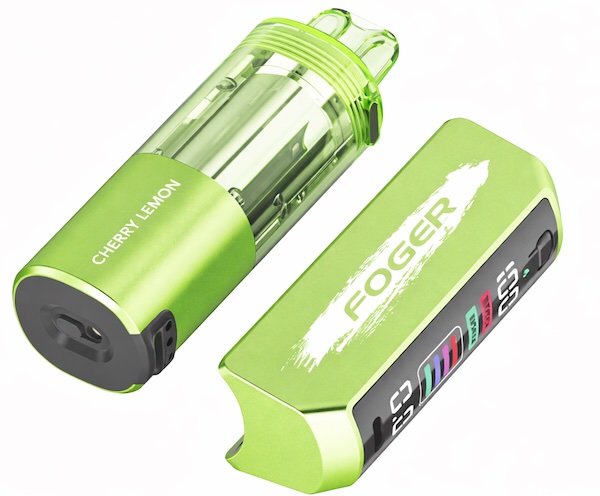

The Foger Switch Pro is one of the most popular vapes on the market today, and the fact that so many people are happily using it is testament to its reliability. You’re bound to experience problems with even the most reliable disposable vapes occasionally, though, and the fact that the Foger vape is more complicated than other devices means that troubleshooting it can sometimes be a challenge. Never fear, though, because you’re in the right place if your Foger vape isn’t working. In this guide, I’ll list the most common Foger vape problems and explain their fixes.
Recent Price Drop
The Geek Bar Pulse is just $16.99 after a recent price drop! Take an additional 20% off with the coupon code VAPEGRL. Shop Now.
Foger Vape Not Charging
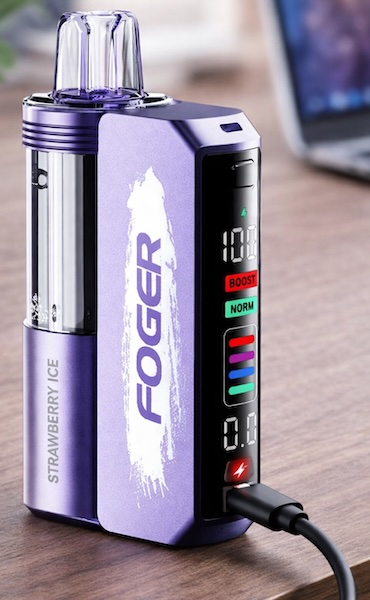
By far, the most common problems with the Foger Switch Pro all involve charging. That’s because the two-part system creates additional points of failure compared to traditional vapes. Before you begin troubleshooting a charging problem with your Foger vape, make sure that you have both required components – the dock and the pod – and that you’re charging the device correctly.
- You charge the dock by connecting to your computer or a wall adapter with a USB cable. When the dock is charging, the battery meter on the screen turns on.
- You charge the pod by connecting it to the dock. When the pod is charging, a lightning bolt icon appears on the dock’s screen.
If you charge the Foger dock with a pod connected, both batteries will charge simultaneously.
Foger Dock Not Charging (Screen Doesn’t Turn On)
If the screen on the Foger dock doesn’t turn on when you connect it to a USB power source, the dock isn’t charging. Follow these steps.
- Use a different USB cable. USB cables wear out quickly, and replacing the cable will fix a charging issue almost every time.
- Use a different power source. The Foger vape should always charge through a computer’s USB port, but it can be finicky with wall adapters. Don’t use a high-speed charger intended for phones or computers.
- Clean the charging port. If the port is blocked by lint or dust, your Foger vape won’t charge. Remove the debris with a toothpick.
Foger Pod Not Charging (No Lightning Bolt on Screen)
When the Foger dock is charging the pod, the screen displays a lightning bolt icon. If you don’t see the lightning bolt, the pod isn’t charging. Follow these steps.
- Try vaping. If the pod is fully charged already, you won’t see a lightning bolt icon on the dock.
- Wiggle the pod. You can also try removing and reseating it. The pod will only charge if all of the metal contacts are touching.
- Clean the contacts. If any of the metal contacts are dirty or have e-liquid on them, the pod will have trouble charging.
- Make sure the contacts aren’t stuck. They’re spring loaded and should pop back when you push on them.
- Disassemble the pod. You can open the pod by twisting the bottom and tugging lightly. Make sure that the contacts touch the charging wires for the battery when they’re pushed in. If the contacts don’t touch, adjust the wires.
How Long Does the Foger Vape Take to Charge?
The Foger dock and pod have a combined battery capacity of 1,050 mAh. If both are completely dead, charging them fully will take a little over an hour.
Foger Vape Not Hitting
If your Foger vape doesn’t generate vapor when you puff on it, it’s not hitting. Here are the steps to follow depending on the exact symptoms you’re seeing.
Foger Vape Blinks or Does Nothing
If your Foger vape blinks when you try to vape – or it does nothing at all – it most likely means that the battery is dead. Charge the dock and pod fully and try vaping again. If you encounter a charging problem, troubleshoot it using the steps above.
Are you sure that your device is fully charged? The Foger Switch Pro can also cut off if it overheats. Don’t vape in direct sunlight and don’t leave the device in a parked car.
Foger Pod Only Works on the Dock
If your Foger pod only works when it’s connected to the dock, the battery in the pod has probably failed. In this case, the pod won’t work on its own; you’ll need to use it with the dock until it runs out of e-liquid.

When you buy a new Foger pod, you should always check its authenticity by checking the scratch-off code on the box with the authenticity checker on the official Foger website. A single pod with a problem could just be a dud. If you experience this problem repeatedly, though, it’s possible that you’re buying counterfeit products.
- The only official Foger website is Fogertech.com. Foger sells to vape shops and distributors on a wholesale basis and does not sell directly to the public. Any website that sells direct to consumers – even if it has “Foger” in the name – is not the official Foger site, regardless of what it claims.
- You won’t have to worry about fake Foger vapes if you buy from the best online vape shop for e-juice and mods.
Foger Vape Only Works When Connected to USB
One difference between the Foger Switch Pro and other disposable vapes is that the dock isn’t a disposable component; you keep it and just buy replacement pods in the future. The dock won’t last forever, though, and the battery will eventually stop accepting a charge. When that happens, the dock will only work when it’s connected to USB power.
You can expect the Foger dock to last anywhere from several months to about a year. When the battery reaches the end of its life, you’ll need to replace it.
Foger Vape Cuts Off During a Hit
If your Foger vape cuts off during a hit, it means that you’re “hitting a blinker” or exceeding the device’s built-in puff timer. Take shorter puffs to prevent this from happening.
Foger Vape Hits on Its Own
If your Foger vape hits on its own or continues hitting when you stop inhaling through it, the pod’s internal puff sensor is stuck. You can blow firmly through the mouthpiece to unstick the sensor. To prevent this issue from happening in the future, refer to the “Foger Vape Leaking” section below.
Foger Vape Tight Draw
Are you experiencing an airflow issue with your Foger vape? Try these steps.
- Check the airflow slider on the bottom of the pod and make sure that it isn’t closed.
- Shine a flashlight down the pod’s mouthpiece and confirm that the airflow isn’t blocked by pocket lint or other debris.
- Don’t puff too hard when using the Foger vape. If you hear gurgling, you’re pulling e-liquid into the airflow channel and should use gentler air pressure.
Foger Vape Leaking
Leaks with the Foger vape almost always come down to puffing too hard because of the device’s tank-based design. If you use too much air pressure when inhaling, you’ll flood the coil assembly with excess e-liquid. The likely symptoms of this problem include:
- You hear a gurgling sound when you vape.
- Your vape spits e-liquid into your mouth.
- You see e-liquid coming out of the mouthpiece or air vent.
You can prevent all of these things from happening by using gentler air pressure when you vape. Although you can’t remove e-liquid that’s already leaked into the body of the pod, you can remove excess vape juice from inside the mouthpiece using a cotton swab or a rolled-up piece of paper towel.
Another side effect of the Foger vape’s tank-based design is that it can leak if it’s left on its side for too long. Store the device with the mouthpiece facing up if you won’t be using it for several hours.
Foger Vape Tastes Weak
Does your Foger vape seem to produce a weak flavor?
- Click the button on the dock to switch to the dual-coil mode. It’s possible that the single-coil mode doesn’t produce quite enough vapor for your taste.
- Charge the dock and pod. If the pod’s battery is low, the vapor production will decrease.
- Check the e-liquid level. If the tank is almost empty, the e-liquid won’t be able to saturate the wick efficiently. You can alleviate the issue somewhat by waiting longer between puffs, but you should get ready to replace the pod soon.
Foger Vape Tastes Burnt
Is your Foger vape producing a burnt flavor? Here’s what could be happening.
- Your vape could be overheating. Don’t vape in direct sunlight or leave your device in a hot car.
- You could be chain vaping. Always wait a few seconds between puffs to give the wick time to refresh itself – especially if you’re using your device in the dual-coil mode.
- Your vape could be empty. If you’ve used all of the juice, your Foger vape will taste burnt every time you puff on it.
Other Foger Vape Problems
If you have a question about the Foger vape that hasn’t been answered elsewhere in this guide, you’ll find the information you need here.
Error 188
If you see a “188” error on your Foger Switch Pro, it can indicate a critical error with the pod or that the pod and dock are unable to communicate with one another.
- Go through the steps under “Foger Pod Not Charging” above to troubleshoot a connection issue between the pod and dock.
- If you see the 188 error after dropping your Foger vape on a hard surface or in water, it’s likely that the pod is damaged. You should replace it.
Lightning Bolt Keeps Appearing
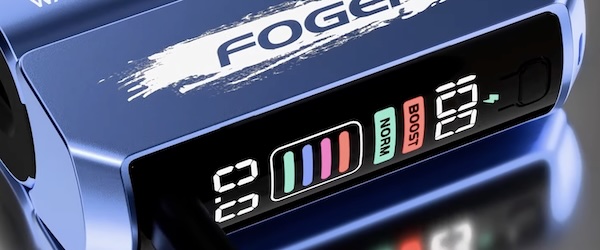
If the lightning bolt icon appears on the screen of your Foger vape, it means that the dock is charging the battery in the pod. It’s normal for the icon to appear and disappear if the pod’s battery is nearly full.
Do the Colored Lights on the Foger Vape Indicate a Problem?
The colored lights on the Foger Switch Pro don’t indicate a problem and don’t communicate anything about the device’s status. They’re just there to add interest and indicate that the device is operational.
Can You Reset the Foger Switch Pro?
The Foger vape doesn’t have a reset or on-off function. However, you can reset the connection between the dock and the pod by removing the pod and reseating it.

0 Comments